Zipline - File Download Project
Follow along with the development and deployment of the Zipline project to download memes, files, and much more!
- Zipline - File Sharing
- n8n - The Automation Powerhouse
- Apple Shortcuts: The Ultimate solution for webhooks
- Drawbacks & ToDo
Zipline - File Sharing
What is Zipline?
Zipline is a self hosted sharing beast. It allows you to upload files to it (including videos, images, and others) and share them with a URL. The URL has metadata that works with most common messaging platforms allows for the content to be viewed directly in said platform. So far I have been able to confirm this working on Discord (what Zipline has focused on the most) and iMessage / Apple Messages (using specific video conversion methods).
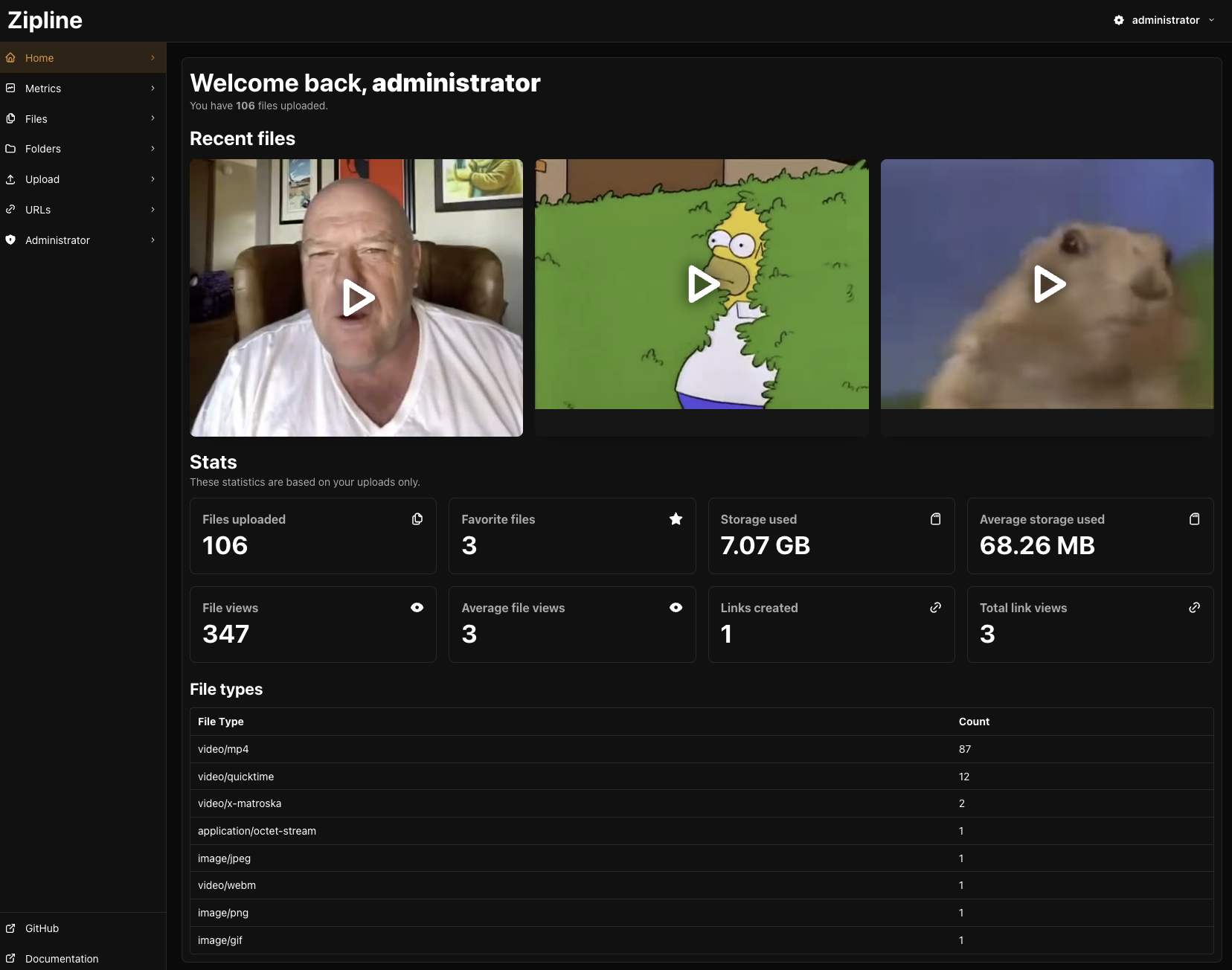
With Zipline, its stupid simple to download and share memes and other content. For the most part its used to quickly upload files to then share with others. But my use case is more of a meme storage vessel.
The only issue I have with Zipline is that I can't just give it a URL, and have it download the content from it, and save it. This is where the project gets interesting.
n8n - The Automation Powerhouse
What is N8N
N8N is a automation platform that deals mostly with web requests, Javascript, and JSON. N8N is really good for automating web based platforms and creating unique connections between systems.
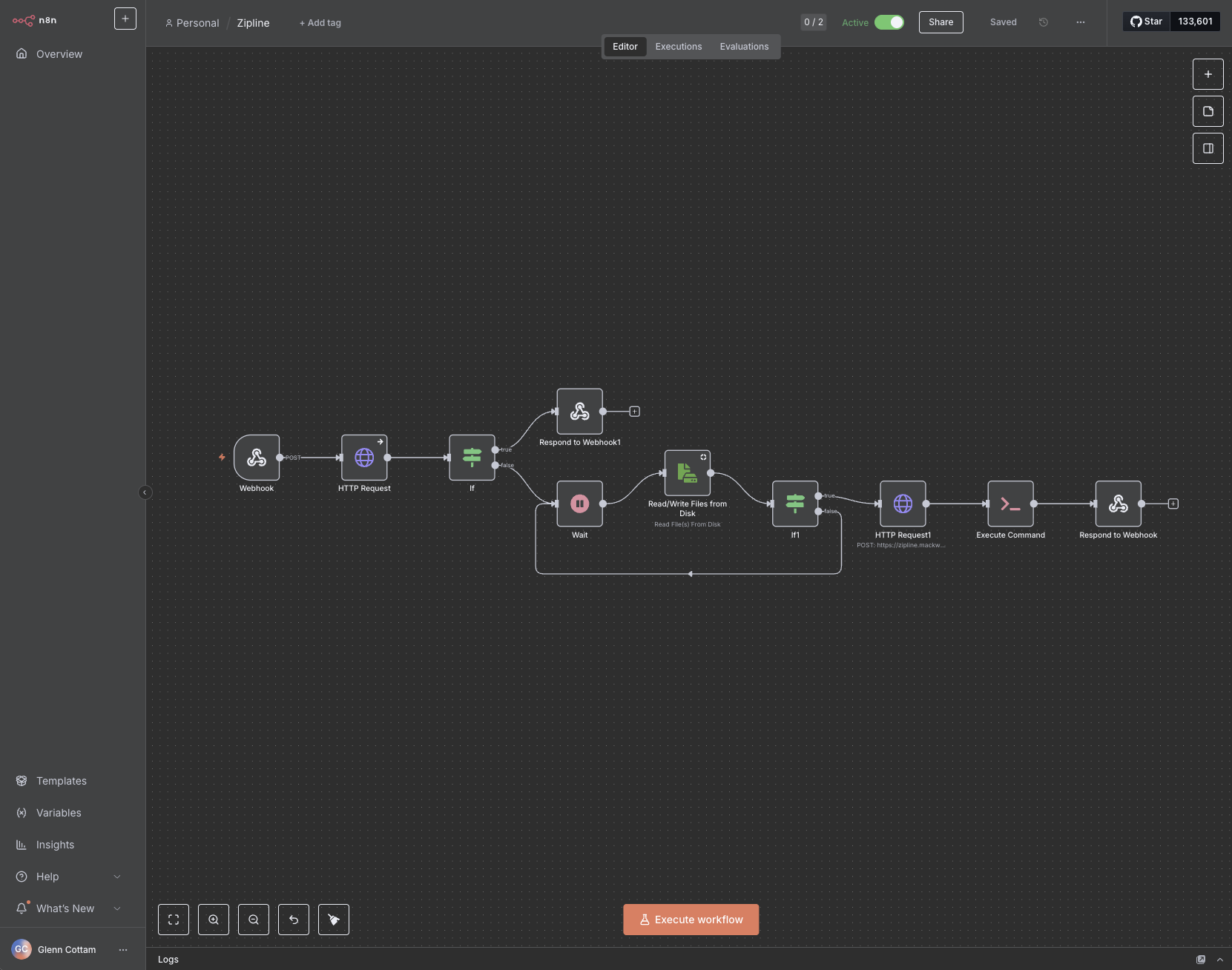
In this case, I am using N8N to automate the capture of a video on the internet, uploading that video to Zipline, then with the link that Zipline provides, deliver back by responding to the webhook. This system is the backend for submitting video URL's, where Apple Shortcuts is the connector or the "front end" or client.
The one thing I have not touched on yet is the secondary docker container running in a stack. This docker container is one that runs "Yt-dlp" which is a youtube downloader but it works for most forms of content on the internet (including x/twitter, instagram etc...). The docker container in question is just an API that accepts a few things including the url. I will detail that side of the configuration a bit later since it does deal with some custom parameters.
The Zipline Workflow
I will now go over the rough detail on how this workflow automates!
Entrypoint: Webhook
N8N listens for a post request containing the URL of the video that should be downloaded. It waits for the entire system to finish before responding to the webhook.
HTTP Request to the Downloader
Once submitted, the workflow sends the url directly to the YT-DLP docker container which downloads the video, and responds with either a success message, or an error. It saves the file in a default location with a default file name to make things smoother.
Dealing with YT-DLP errors & Responding to Webhook
Sometimes, YT-DLP does not like the URL given and either cannot find the video, or doesn't support the service / website. The IF statement here handles this by returning the error of the request back to respond to the webhook. This allows the webhook to receive the error generated by YT-DLP for troubleshooting. This allows the Apple Shortcut to also work with the error.
Wait: Playing the waiting game
Unfortunately, I couldn't find a way for the YT-DLP API container to respond AFTER the file has finished downloading which means it gets stuck in a queue to be processed. This is... fine... but unfortunate at the same time. But to work around this, the best thing I have created is a loop that every 5 seconds, attempts to read the default filename. If it doesn't it repeats.
One it CAN read the file, then it proceeds to the next step.
Upload to Zipline
This second HTTP request is for Zipline. It connects directly using the API key in Zipline to upload the downloaded file. I don't have any error checking for this since there really isn't much to mess up. But the Zipline request does respond with the generated URL to be shared with others!
Responding to the Webhook
Again the only thing this does is respond to the webhook with the generated URL to be used with Apple Shortcuts (and copied to my clipboard).
Apple Shortcuts: The Ultimate solution for webhooks
I love Apple Shortcuts
It does need some TLC from Apple if I am being honest. There are some bugs and glitches with the interface itself, but for the most part, its solid to work with. Very similar to N8N but less robust.
Regardless, I use Apple Shortcuts to submit the URL, and retrieve the shared URL from Zipline. Its become incredibly cool and super easy to use.
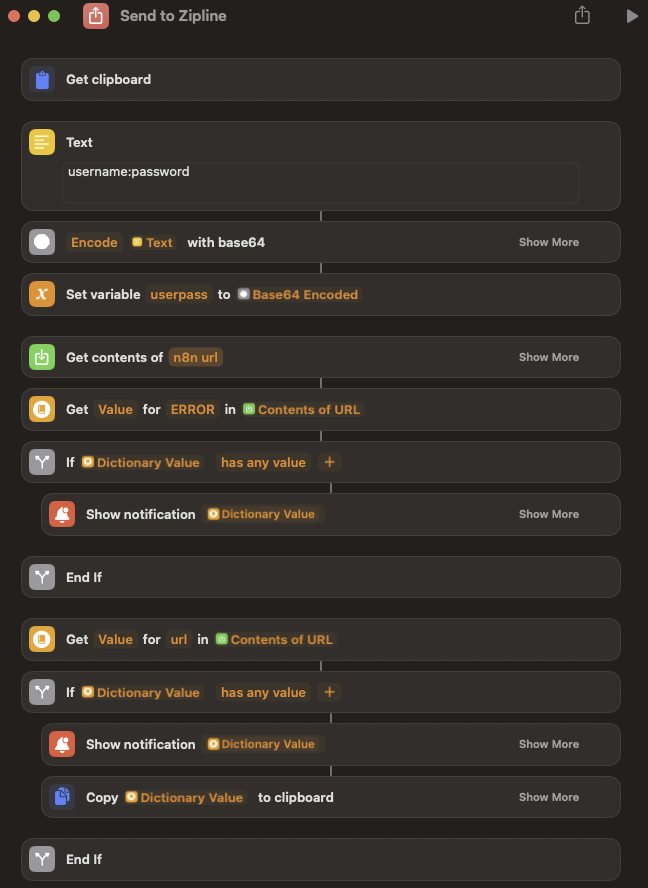
The Shortcut itself looks terrible but isn't actually to bad. Good portion of it is just logic. But I will go over the sections of the Shortcut and how they work!
The Clipboard

> Get Clipboard is stupid cool. The idea is that I simply copy the URL in question into my clipboard, and then run the shortcut. The shortcut will pull that URL from my clipboard and use that in the webhook to Zipline
Submitting the URL
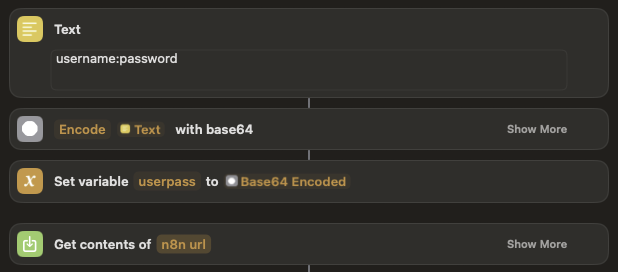
This next step is a bit complicated. But it does work! Using the text box, we enter the username and password with a ":" between them. It then encodes the text with base64, and sets the variable. Then the "Get Contents" action POST's the URL to the webhook on N8N.
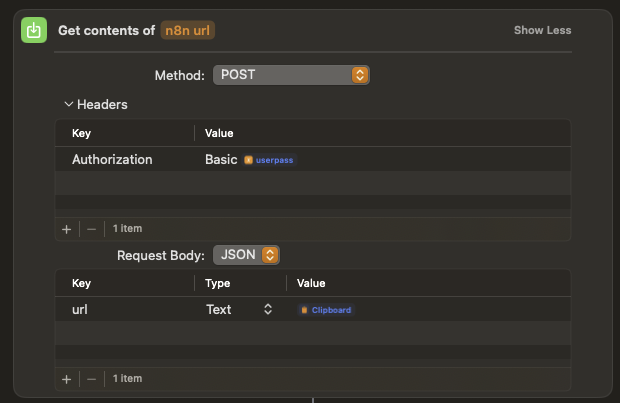
As you can see, the POST action simply uses password authentication with N8N and the body simply contains the url and the contents of the clipboard (url). This goes right to n8n for processing.
On Error
As previously discussed in the N8N information page, submitting the URL to YT-DLP can result in and error. The next section of the Shortcut works with that error if it exists.
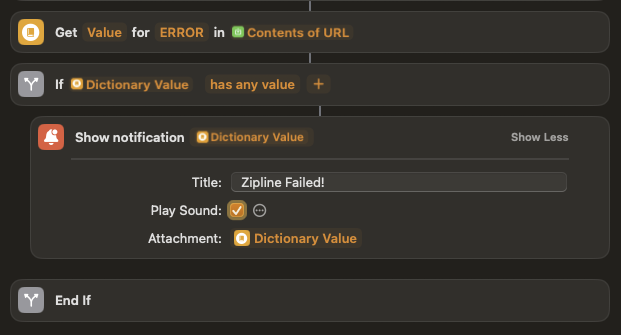
As you can see, the Shortcut attempts to pull the value from "ERROR" in the JSON response, and if it does exist, send a notification (with sound) indicating the failure, with the included error code. This allows the user to acknowledge there was an issue with the submission.
Processing the Response
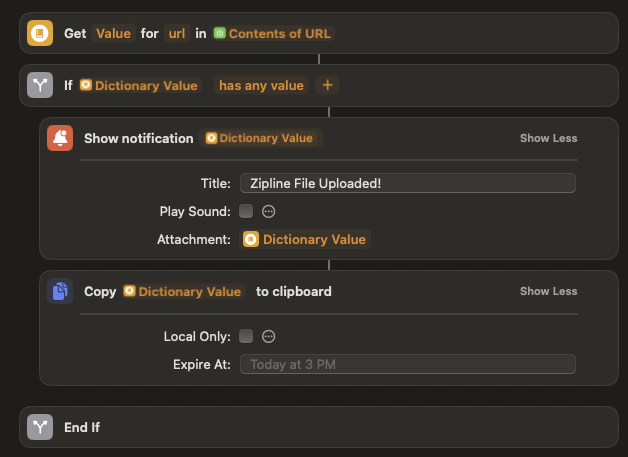
The next section does the same thing as the error check, but grabs the Zipline shared URL from the response, send a notification (without sound) with the URL, and also copies the URL to the clipboard so you can just paste.
Usage:
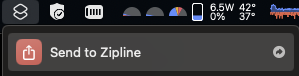
The way I have the shortcut setup is actually quite neat. I just copy the URL I want to download, click the Shortcut button in the menu bar of my mac, and then execute the shortcut. Once its finished, I have the sharable URL already in my clipboard and I can just paste it into nearly any chat.
Drawbacks & ToDo
File handling
Of course there are some drawbacks to this system and I will most likely edit the N8N workflow to include a bunch of additional measures to make the flow much easier and more broad in scope.
Ideally, I'd like to copy a picture URL and be able to also submit it to Zipline to archive images too. Sure I can just download them to my device or simply copy-paste them, but again this project is about keeping memes and other content saved and archived for use later. Its more about preserving memes and meme culture.
It shouldn't be too difficult to create some additional switches within N8N to handle specific types of URL's etc... or have additional settings. Regardless of implementation, having a more broad solution is ideal.
Opening Files
One of the things n8n has to do to upload something to Zipline (from what I can tell) is to READ the file completely in N8N. This means that entire file must fit into RAM. This is a problem.
In order to be more reliable, I had to move the Zipline / N8N stack over to my Unraid server from my Raspberry Pi, as I attempted to upload a 8GB file to Zipline and it fully crashed the Raspberry Pi because of its limited RAM.
There may be another way to do this sort of thing (maybe through a custom shell command run in N8N), but for now, its a big limitation and that CAN crash the system. I should honestly report this to N8N as an issue so it can be limited by system memory and throw an error rather than crashing the entire system.
Regardless, my Unraid server has a shit load of RAM and it can handle very large files with ease.