
n8n - The Automation Powerhouse
What is N8N
N8N is a automation platform that deals mostly with web requests, Javascript, and JSON. N8N is really good for automating web based platforms and creating unique connections between systems.
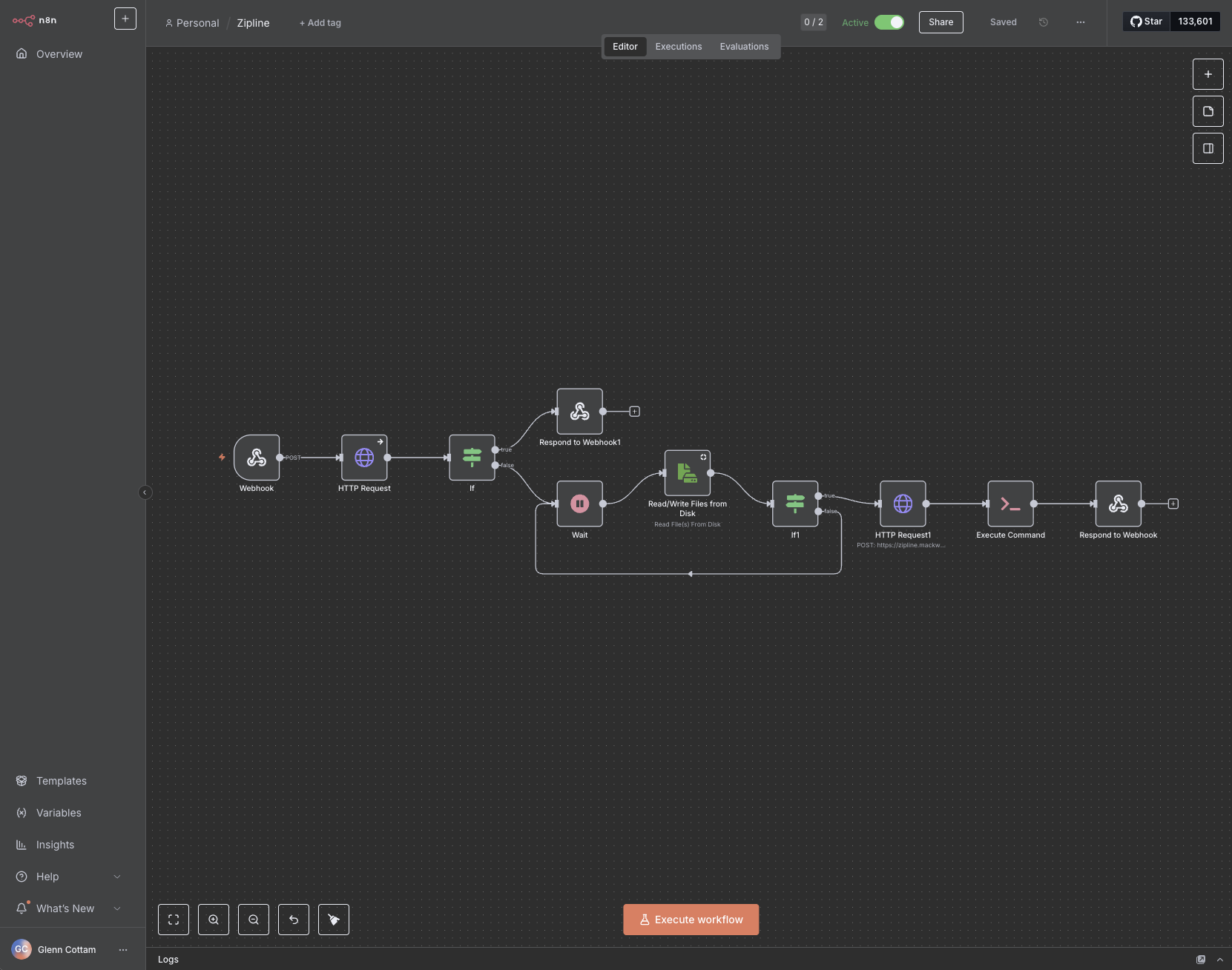
In this case, I am using N8N to automate the capture of a video on the internet, uploading that video to Zipline, then with the link that Zipline provides, deliver back by responding to the webhook. This system is the backend for submitting video URL's, where Apple Shortcuts is the connector or the "front end" or client.
The one thing I have not touched on yet is the secondary docker container running in a stack. This docker container is one that runs "Yt-dlp" which is a youtube downloader but it works for most forms of content on the internet (including x/twitter, instagram etc...). The docker container in question is just an API that accepts a few things including the url. I will detail that side of the configuration a bit later since it does deal with some custom parameters.
The Zipline Workflow
I will now go over the rough detail on how this workflow automates!
Entrypoint: Webhook
N8N listens for a post request containing the URL of the video that should be downloaded. It waits for the entire system to finish before responding to the webhook.
HTTP Request to the Downloader
Once submitted, the workflow sends the url directly to the YT-DLP docker container which downloads the video, and responds with either a success message, or an error. It saves the file in a default location with a default file name to make things smoother.
Dealing with YT-DLP errors & Responding to Webhook
Sometimes, YT-DLP does not like the URL given and either cannot find the video, or doesn't support the service / website. The IF statement here handles this by returning the error of the request back to respond to the webhook. This allows the webhook to receive the error generated by YT-DLP for troubleshooting. This allows the Apple Shortcut to also work with the error.
Wait: Playing the waiting game
Unfortunately, I couldn't find a way for the YT-DLP API container to respond AFTER the file has finished downloading which means it gets stuck in a queue to be processed. This is... fine... but unfortunate at the same time. But to work around this, the best thing I have created is a loop that every 5 seconds, attempts to read the default filename. If it doesn't it repeats.
One it CAN read the file, then it proceeds to the next step.
Upload to Zipline
This second HTTP request is for Zipline. It connects directly using the API key in Zipline to upload the downloaded file. I don't have any error checking for this since there really isn't much to mess up. But the Zipline request does respond with the generated URL to be shared with others!
Responding to the Webhook
Again the only thing this does is respond to the webhook with the generated URL to be used with Apple Shortcuts (and copied to my clipboard).
No comments to display
No comments to display